A multi-layer cybersecurity homelab combining OPNsense, NordVPN, PiHole, Tailscale, and Vaultwarden. From CNC machinist to cybersecurity engineer β this is my journey, documented in code and configs.
Each layer protects independently. If one fails, the others continue defending. This is the essence of defense in depth β and the principle this lab is built around.
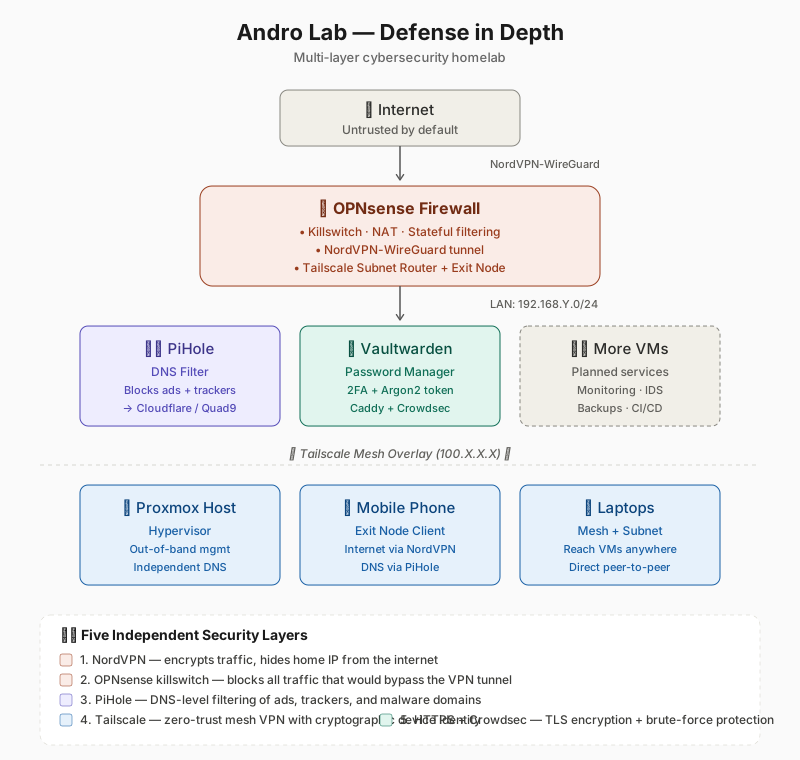
Hides home IP, encrypts traffic to the internet via WireGuard tunnel.
Killswitch, stateful filtering, network segmentation. Configured by hand.
DNS-level ad-blocking, tracker blocking, malware domain filtering.
Zero-trust mesh VPN. Devices identify cryptographically β no shared passwords.
Application-layer TLS encryption with brute-force protection.
Not theory β working infrastructure I use every day.
All LAN traffic flows through NordVPN. Killswitch prevents leaks. DNS filtered through PiHole.
Tailscale mesh: phone and laptop reach lab from anywhere. Subnet routing for full LAN access.
Diceware master passwords (80+ bits entropy). TOTP 2FA. Argon2-hashed admin tokens.
Snapshot-based recovery. Volume persistence. Service isolation. Automatic restarts.
The components I configured, broke, and rebuilt to make this work.
Theory is clean; practice is messy. These are the moments that taught me more than any tutorial could.
Routing through a VPN tunnel requires firewall-based gateways, not changing the default route. Took three full rebuilds to learn this.
Exit-node packets were rewritten before reaching firewall rules. Hours of tcpdump debugging led to one checkbox: "Disable SNAT".
Proxmox host must not depend on PiHole VM for DNS. A circular dependency at boot can ruin your day.
`uname -r` before `apt autoremove`. Removing the running kernel is a one-way trip to an unbootable system.
Caddy's "Caddyfile not formatted" looks scary. It's purely cosmetic. Read log levels carefully before panicking.
Every nontrivial change got a labeled, dated Proxmox snapshot. Storage is cheap; debugging time is expensive.
Full details in lessons-learned.md on GitHub.
Detailed setup guides, anonymized configs, and architecture deep-dives β all on GitHub. Open source, MIT licensed.
π¦ View andro-lab on GitHub